Are we visible?
Visibility score and movement, average rank when the brand appears, prompt coverage, and results by AI model.
See the reporting-period outcome and where visibility needs attention.
White-label AI visibility reporting
Turn AI visibility data into a report clients can understand. Show where the brand stands, why competitors are winning, which sources shape AI answers, and what your agency recommends next.
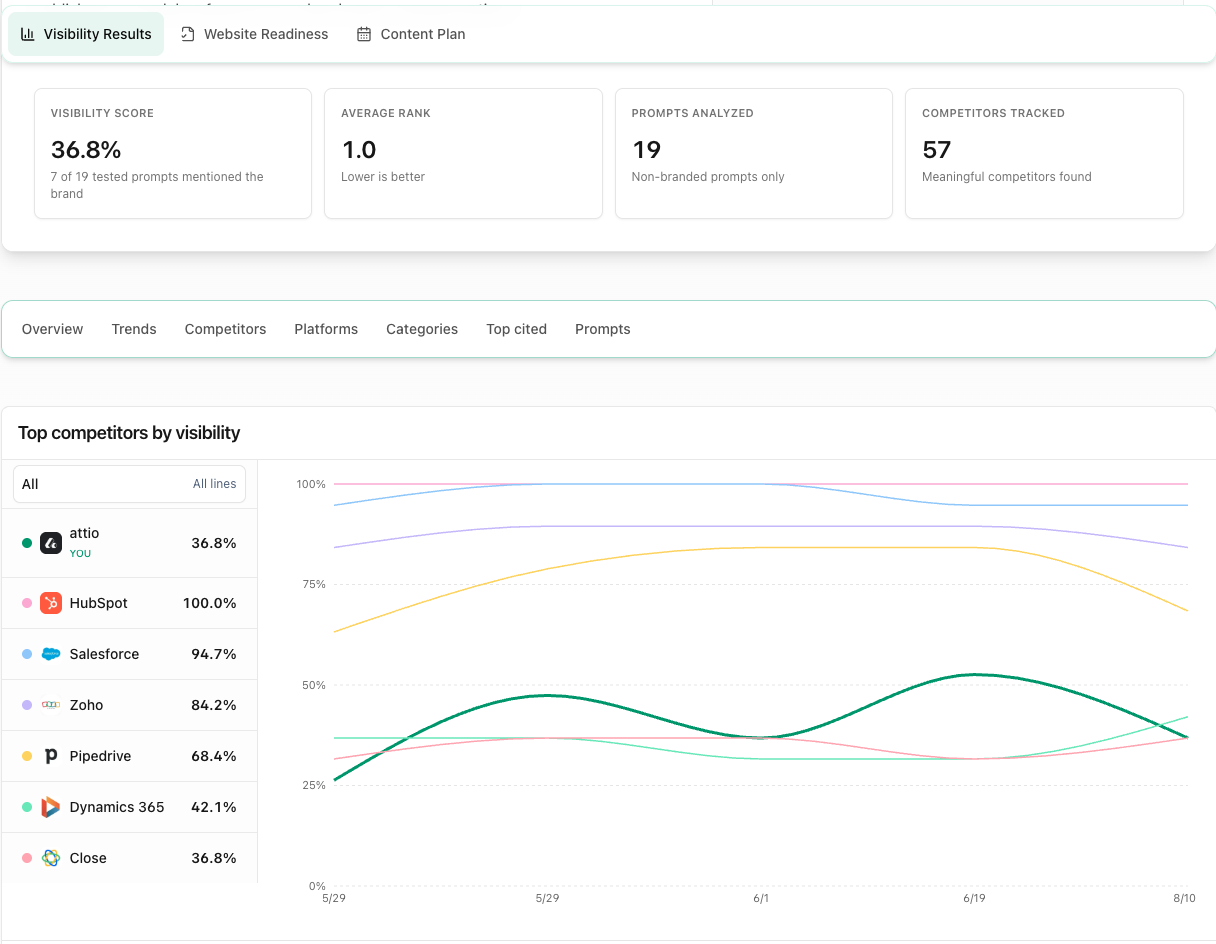
A white-label AI visibility report is a branded, read-only snapshot that explains where a client appears in AI answers, which competitors are winning, what sources AI systems cite, and what the agency should do next.
A reporting story clients can act on
Move from outcome to evidence to action without asking clients to interpret a dense analytics dashboard.
Visibility score and movement, average rank when the brand appears, prompt coverage, and results by AI model.
See the reporting-period outcome and where visibility needs attention.
Competitor rankings, share of voice, category gaps, and interactive competitor drill-downs.
Identify the competitors and categories your agency should prioritize.
Owned, competitor, community, and third-party cited domains, plus prompt-level answer previews and sources.
See which sources shape AI answers and where new authority is needed.
A data-driven overview, recommended next move, Website Readiness actions, recent content, and an optional 30-day Content Plan.
Turn the evidence into an agency-approved plan the client can understand.
See the report from the client side
Open the interactive, read-only example. No login required.
From monitoring to client report
Run visibility monitoring across the prompts, competitors, models, and citations that matter.
Approve the wins, losses, sources, and next actions before the client sees them.
Choose the last 7, 30, or 90 days, or use all available history.
Create a frozen snapshot, then share its read-only link or PDF-ready view.
A frozen snapshot gives your client an approved reporting-period record they can review, reference, and compare later. The evidence does not change after the meeting while monitoring continues in your workspace.
Branding, access, and delivery
Save your agency identity once, approve the reporting story, and share a fixed client record without opening your workspace.
Agency name, logo, accent color, report title, and executive summary.
Good to knowCustom report domains are not currently included.
One tokenized, read-only URL with no client login or workspace access.
Good to knowAnyone with the link can view it. Password protection is not currently included.
Leave the link active or set it to expire after 7, 30, or 90 days.
Good to knowAccess ends when the selected expiry is reached.
Open the print-optimized report and choose Save as PDF in the browser.
Good to knowThe product does not create or email a separate attachment automatically.
Create each report after your agency has reviewed and approved the reporting story.
Good to knowReports are not created or sent automatically.
Agency plan availability
Pitch new business
Up to 10 free white-label audit reports for pitch workspaces each month.
Report on active clients
For ongoing client work, create a fresh, approved snapshot whenever your reporting cycle is due. Monitoring capacity and frequency vary by plan.
Build the service around the report
Give every client a fixed reporting-period record, the evidence behind it, and a clear next move.
We use cookies to enhance your experience, analyse site traffic and measure advertising. Read our Cookie Policy